


Introduction
The Kim Zolciak house listing has become one of the most talked about celebrity real estate stories in Georgia. The mansion once shared by reality television star Kim Zolciak and former NFL player Kroy Biermann has gone through a dramatic journey involving divorce, foreclosure trouble, price cuts, and a forced move.
The biggest update is that the property has returned to the market after the former couple lost the home through foreclosure proceedings. In April 2026, Realtor.com reported that the mansion was listed again, with the asking price later reduced from about $4.65 million to approximately $4.19 million.
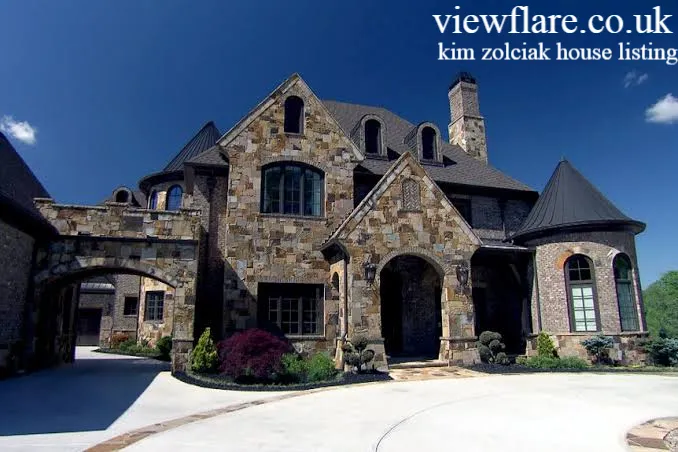
So, what makes this property so interesting? It is not simply a celebrity home. The estate offers more than 15,600 square feet of living space, seven bedrooms, multiple entertainment areas, a luxury pool, a wine cellar, a home theater, and extensive outdoor amenities.
If you are searching for the latest Kim Zolciak house listing, here is everything you need to know about the property’s price, features, history, and current status.
Is the Kim Zolciak house listing still active?
Yes. The former Zolciak and Biermann mansion returned to the market in 2026 after the property went through foreclosure and the couple were removed from the home by U.S. marshals in April 2025.
The latest reported asking price is about $4.19 million. Realtor.com reported that the property initially returned to the market at approximately $4.65 million before receiving another price reduction.
This is important because the property had previously been listed for much more.
Current property snapshot
| Property detail | Latest reported information |
|---|---|
| Location | Milton, Georgia |
| Living space | More than 15,600 square feet |
| Bedrooms | 7 |
| Bathrooms | 8 full and 3 half bathrooms |
| Lot size | About 1.78 acres |
| Latest asking price | About $4.19 million |
| Original 2023 asking price | $6 million |
| Purchase price in 2012 | $880,000 |
| Major features | Pool, wine cellar, theater, gym, arcade and basketball court |
| Former owners | Kim Zolciak and Kroy Biermann |
The numbers show why the Kim Zolciak house listing continues to attract attention. It combines celebrity history with the scale of a luxury estate.
Where is Kim Zolciak’s former house located?
The mansion is located in Milton, Georgia, in the Atlanta metropolitan area. The property sits near the border with Alpharetta and overlooks a lake and the 18th fairway of The Manor Golf and Country Club area.
Milton is known for large residential properties, spacious lots, and upscale communities. The location also gives the mansion a strong luxury real estate appeal beyond its celebrity connection.
For buyers, the setting is one of the property’s biggest selling points. The estate offers privacy while still providing access to the wider Atlanta area.
What does the Kim Zolciak house offer?
The Kim Zolciak house listing describes a property designed for large scale entertaining and comfortable family living.
The home includes several standout features.
- Seven bedrooms
- Eight full bathrooms
- Three half bathrooms
- More than 15,600 square feet of living space
- Elevator serving multiple floors
- Chef’s kitchen
- Large formal dining room
- Wood paneled study
- Multiple fireplaces
- Entertainment lounge with a full bar
- Home theater
- Arcade and billiards areas
- Gym with private massage room
- Second kitchen and bar
- Climate controlled wine cellar
- Heated vanishing edge pool
- Spa
- Basketball court
- Outdoor entertainment areas
- Six car garage
- Guest or staff suite
The current listing also highlights a distinctive circular sitting room with a domed ceiling and large windows. The primary suite includes a sitting area, fireplace, spa style bathroom, and a large custom closet.
How much was Kim Zolciak’s house originally listed for?
The property originally entered the market in October 2023 with an asking price of $6 million. That figure was later reduced several times as the couple struggled to find a buyer.
By June 2024, the asking price had fallen to $4.2 million. It was reduced again to approximately $3.95 million in August 2024.
The price history looked like this:
- $6 million in October 2023
- $5.5 million in December 2023
- $4.5 million in early 2024
- $4.2 million in June 2024
- $3.95 million in August 2024
- About $4.19 million on the new 2026 listing
This history makes the Kim Zolciak house listing particularly interesting from a real estate perspective. The asking price moved significantly as the property remained unsold and foreclosure pressure increased.
Did Kim Zolciak sell the house for $2.75 million?
Yes, but the situation requires some explanation.
Reports in February 2025 said Kim Zolciak and Kroy Biermann had sold the Georgia mansion for $2.75 million. The reported sale came after more than a year of listing attempts and foreclosure pressure.
However, the property later returned to the market following the foreclosure process. Realtor.com reported in April 2026 that the mansion had been put back on the market after the former owners were forced out.
That means readers should be careful when they see older articles describing the home as simply sold. The property’s ownership and listing history changed after the foreclosure proceedings.
Why did Kim Zolciak lose the mansion?
The mansion became connected to a long running financial and legal dispute involving Zolciak and Biermann.
The couple faced mortgage problems and foreclosure proceedings while going through their highly publicized divorce. Their home was repeatedly placed at risk of foreclosure, while attempts were made to sell the property and resolve the financial situation.
In December 2024, the property was scheduled for a public foreclosure auction. The auction situation changed as the parties continued dealing with the property.
By April 2025, court documents indicated that U.S. marshals removed Zolciak and Biermann from the property.
The story shows how quickly a luxury property can become complicated when mortgage obligations, divorce proceedings, and ownership issues overlap.
How much did Kim Zolciak pay for the house?
Kim Zolciak and Kroy Biermann purchased the property in 2012 for approximately $880,000. source: Bravo
That purchase price looks remarkably low compared with the later asking prices. At one point, the couple sought $6 million for the estate.
Of course, the property’s value cannot be measured only by the purchase price. The couple made improvements over the years, and the home became a large luxury estate with extensive amenities.
The property also gained additional celebrity value because it appeared prominently in the Bravo reality series Don’t Be Tardy. The show documented the family’s life in the mansion across multiple seasons.
What makes the new listing different?
The biggest difference is the property’s history.
The current listing focuses heavily on the physical qualities of the estate rather than its previous financial and legal drama. Realtor.com noted that the listing description does not emphasize the celebrity ownership or the foreclosure history. Instead, it presents the property as a luxury brick and stone estate with resort style amenities.
From a marketing perspective, that makes sense.
A potential buyer is likely more interested in the home’s architecture, privacy, entertainment spaces, pool, views, and location than in the previous owner’s television career.
Is the Kim Zolciak house worth $4.19 million?
That depends on the buyer and the local luxury market.
The property offers an unusually large amount of living space and an extensive list of amenities. It also sits on nearly 1.8 acres with views toward a lake and golf course.
However, celebrity history does not automatically guarantee a premium price.
The property’s previous listing history demonstrates that asking $6 million did not attract a buyer. The final reported sale price in 2025 was substantially lower than that original asking price.
For a buyer, the more useful question is whether the current asking price makes sense compared with other luxury homes in Milton.
What can buyers learn from this celebrity home?
The Kim Zolciak house listing offers an interesting lesson about luxury real estate.
A famous owner can generate attention, but attention does not always translate into a quick sale. Location, condition, pricing, financing, and market demand remain critical.
There is also a major difference between an asking price and a final sale price. The mansion was once marketed at $6 million, yet the reported 2025 transaction was $2.75 million.
For buyers and sellers, that is perhaps the most important lesson.
Conclusion
The latest Kim Zolciak house listing gives this famous Georgia mansion another chapter. After years of television exposure, divorce drama, price reductions, foreclosure threats, a reported $2.75 million sale, and the former owners’ removal from the property, the estate is once again being marketed as a luxury home.
The current reported asking price is about $4.19 million. The mansion offers more than 15,600 square feet, seven bedrooms, extensive entertainment spaces, a wine cellar, theater, gym, pool, basketball court, and six car garage.
The property proves that celebrity real estate can be just as unpredictable as celebrity life itself. If you were shopping for a luxury home in Milton, would this mansion’s impressive features outweigh its complicated history?
FAQs
Is the Kim Zolciak house currently for sale?
Yes. The former Georgia mansion returned to the market in 2026. The latest reported asking price is about $4.19 million.
How much did Kim Zolciak’s mansion sell for?
Reports said the property sold for $2.75 million in January 2025. It later returned to the market after the foreclosure process.
Where is Kim Zolciak’s former mansion?
The property is in Milton, Georgia, near Alpharetta and approximately 30 miles north of Atlanta.
How big is Kim Zolciak’s former house?
The mansion has more than 15,600 square feet of living space and sits on roughly 1.78 acres.
How many bedrooms does the mansion have?
The property has seven bedrooms.
What luxury features does the mansion have?
Major features include a heated pool, spa, wine cellar, home theater, arcade area, gym, basketball court, elevator, entertainment lounge, and six car garage.
Did Kim Zolciak and Kroy Biermann own the house?
Yes. Zolciak and Biermann purchased the property together in 2012 for approximately $880,000.
Why did the house become involved in foreclosure?
The property became part of the couple’s financial and legal disputes during their divorce after mortgage and debt problems created foreclosure pressure.
Was the house featured on television?
Yes. The mansion appeared prominently in Bravo’s Don’t Be Tardy, which followed Kim Zolciak and her family.
Mets vs White Sox Match Player Stats
About the Author: Awais khan The author writes reader focused entertainment and celebrity real estate stories, turning complex property updates into clear, easy to understand articles. Their work focuses on accurate details, current developments, and engaging explanations for online readers.
email: johanharwen@314gmail.com
Author Name: Awais khan