


If you searched for SAP Business 1, you are most likely looking for SAP Business One, SAP’s enterprise resource planning solution for small and midsize businesses. It brings finance, purchasing, inventory, sales, customer relationship management, reporting, and other business processes into an integrated system.
SAP describes Business One as an ERP solution designed to provide real time business information through a single system. It can be deployed in the cloud or on premises, and SAP supports integration with external systems, mobile devices, analytics tools, and extensions.
This guide explains what SAP Business One does, its major modules, how implementation works, and what to know about downloads, customization, training, and support.
What Is SAP Business One?
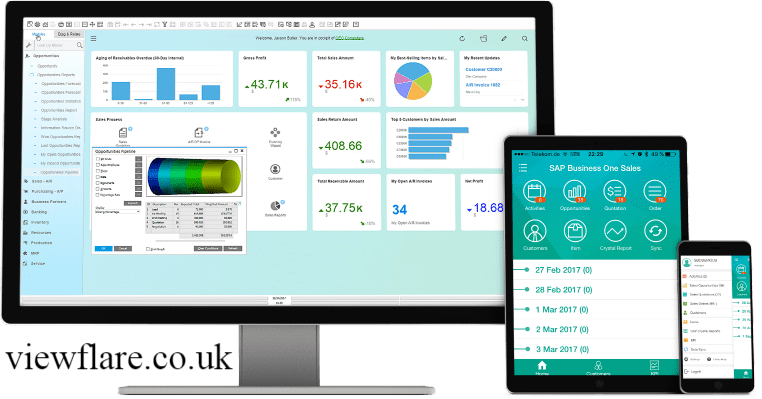
SAP Business One is an integrated ERP platform designed primarily for small and midsize businesses and subsidiaries of larger enterprises. It connects essential business functions so teams can work with shared information instead of relying on disconnected systems.
The platform covers areas including:
- Accounting and financial management
- Sales and customer management
- Purchasing
- Inventory management
- Production
- Project management
- Service management
- Reporting and analytics
SAP’s current documentation identifies Business One 10.0 as an integrated ERP solution for small and midsize businesses and subsidiaries of large enterprises.
The main advantage is integration. Instead of maintaining separate information for finance, inventory, sales, and purchasing, an organization can use a connected ERP environment.
What Are the Main SAP Business One Modules?
SAP Business One modules cover the core processes that most growing companies need to manage their operations.
| Module | Main purpose |
|---|---|
| Financial Management | Accounting, payments, journal entries and financial reporting |
| Sales and CRM | Customers, quotations, orders, deliveries and relationships |
| Purchasing | Suppliers, purchase orders, receipts and invoices |
| Inventory | Items, stock movements, warehouses and inventory control |
| Production | Production orders, bills of material and manufacturing processes |
| MRP | Material planning and requirements |
| Service | Service calls, contracts and customer support |
| Project Management | Projects, stages, resources and time |
| Reporting and Analytics | Business intelligence, dashboards and operational reporting |
SAP’s learning resources describe Business One as covering finance, sales, purchasing, inventory, production, project management, customer and supplier relationships, service, and reporting.
This modular structure allows businesses to focus on the processes most important to their operations rather than treating every function as a separate application.
How Does SAP Business One Support Digital Transformation?
SAP Business One supports digital transformation by connecting business processes, data, analytics, mobile access, and integrations within an ERP environment.
For example, an inventory transaction can affect operational records while financial and reporting processes use the same underlying business information. This reduces the need for employees to manually reconcile information across multiple systems.
SAP also highlights integration options for dashboards, mobile applications, external solutions, cloud extensions, electronic data interchange, collaboration, and web services.
For growing businesses, that connected approach can improve:
- Operational visibility
- Process automation
- Data accuracy
- Reporting
- Decision making
- Customer management
- Inventory control
- Cross department collaboration
What Does SAP Business One Implementation Involve?
A successful SAP Business One implementation starts with business requirements rather than software configuration.
A practical implementation process typically includes these stages:
1. Define Clear Implementation Goals
Start with measurable business outcomes. Your goals could include improving inventory accuracy, reducing manual data entry, accelerating invoicing, or improving financial reporting.
Clear goals make it easier to evaluate configuration choices and measure ERP implementation success.
2. Involve Key Stakeholders
Include people who understand daily operations. This may involve the finance team, warehouse staff, sales team, procurement team, managers, and other important users.
Their input can reveal workflow problems that may not be visible to senior management.
3. Map Current Business Processes
Document how your company currently handles sales, purchasing, inventory, finance, approvals, and reporting.
Process mapping helps identify inefficient workflows before they are transferred into the new system.
4. Choose an Implementation Partner
A qualified SAP Business One implementation partner can help with planning, configuration, data migration, integrations, testing, training, and go live support.
SAP states that Business One is sold, implemented, and supported through its partner network, with accredited partners providing consulting and implementation services.
5. Prepare and Clean Your Data
Data migration should not simply copy everything from an old system.
Review:
- Customer records
- Supplier records
- Inventory data
- Financial data
- Product information
- Duplicate records
- Outdated information
Clean and standardize data before migration to improve data accuracy after implementation.
6. Configure Before Customizing

SAP Business One provides extensive standard functionality, so customization should have a clear business justification.
Too much customization can increase complexity and make long term maintenance more difficult. When possible, improve the underlying business process instead of recreating every feature of an old system.
7. Train Users
Training should be role based and practical.
For example, finance employees need different training from warehouse employees. Hands on exercises based on real workflows can improve confidence and user adoption.
SAP provides Business One learning and training resources, including free training materials and certification options.
8. Test Real World Scenarios
SAP Business One testing should include realistic business workflows.
Test scenarios such as:
- Creating a quotation
- Processing a sales order
- Receiving inventory
- Creating an invoice
- Processing payments
- Completing approvals
- Running financial reports
- Handling incorrect or incomplete transactions
User acceptance testing is particularly important because actual users can identify practical problems before go live.
9. Use a Phased Rollout When Appropriate
A phased rollout can reduce implementation risks for businesses with complex operations.
You might begin with finance, purchasing, and inventory before expanding into production, CRM, service, or advanced reporting.
10. Plan Post Go Live Support
Implementation does not end when employees start using the system.
A good support structure should define:
- Internal system contacts
- Escalation procedures
- Partner responsibilities
- User support
- Performance monitoring
- Ongoing training
- Future improvements
This helps maintain ERP adoption after the initial launch.
Can SAP Business One Run in the Cloud?
Yes. SAP Business One supports cloud and on premises deployment options.
SAP’s technical documentation identifies cloud, on premises, and mobile options. Cloud deployment can provide access without requiring a company to manage the same infrastructure internally, while on premises deployment can provide organizations with greater direct control over their ERP environment.
The right choice depends on factors such as:
- IT resources
- Security requirements
- Existing infrastructure
- Business growth
- Integration requirements
- Cost structure
- Internal management preferences
Does SAP Business One Support Mobile Access?
Yes. SAP Business One supports mobile access and mobile related capabilities.
Mobile access can be useful for managers and employees who need business information away from a traditional office workstation. SAP also documents mobile access and integrated analytics as part of its Business One technical capabilities.
This can be particularly useful for sales teams, managers, service employees, and executives who need timely information while traveling or working remotely.
Can SAP Business One Be Customized and Integrated?

Yes. SAP Business One can be extended and integrated when standard functionality does not fully meet a business requirement.
SAP documents an integration framework for third party solutions, cloud extensions, electronic data interchange, collaboration, and web services. Partner extensions can also add capabilities and processes on top of the core solution.
This creates an important distinction:
Configuration adapts the system using available functionality.
Customization or extension adds or changes capabilities when a specific business requirement cannot reasonably be addressed through standard features.
A good SAP B1 consulting firm should help determine which approach makes the most sense.
Is SAP Business One Good for Growing Businesses?
SAP Business One can be a strong option for businesses that need integrated ERP capabilities without adopting a larger enterprise platform designed primarily for much bigger organizations.
Its value is particularly relevant when a company has outgrown spreadsheets or disconnected applications and needs better control over financials, inventory, purchasing, sales, customer relationships, and reporting.
SAP says Business One is designed for small and midsize businesses and provides real time information for decision making.
However, the software should not be selected simply because it is an SAP product. Businesses should evaluate their processes, industry requirements, budget, integrations, users, deployment preferences, and implementation partner before making a decision.
SAP Business One Download: What Should You Know?
People searching for SAP Business One download, SAP Business One PDF, or SAP Business One free download should distinguish between documentation and the actual commercial software.
SAP provides official documentation, learning resources, technical information, and product materials online.
A PDF may therefore refer to a product guide, technical document, training material, or solution brief rather than a free full installation of the ERP software.
For software trials, SAP provides an official Try SAP portal with available product experiences and trial options.
Avoid unofficial websites offering unknown installers or unauthorized copies. For production use, obtain SAP Business One through SAP or an authorized partner.
What Are the Biggest SAP Business One Implementation Mistakes?
The most common problems are often related to planning rather than the ERP software itself.
Watch for these issues:
- Starting without clear business goals
- Ignoring key stakeholders
- Migrating unclean data
- Over customization
- Insufficient employee training
- Skipping user acceptance testing
- Trying to launch everything simultaneously
- Failing to define support responsibilities
- Recreating inefficient old workflows
- Treating go live as the end of the project
A strong implementation strategy focuses on business outcomes, data quality, user adoption, and long term maintainability.
Final Thoughts
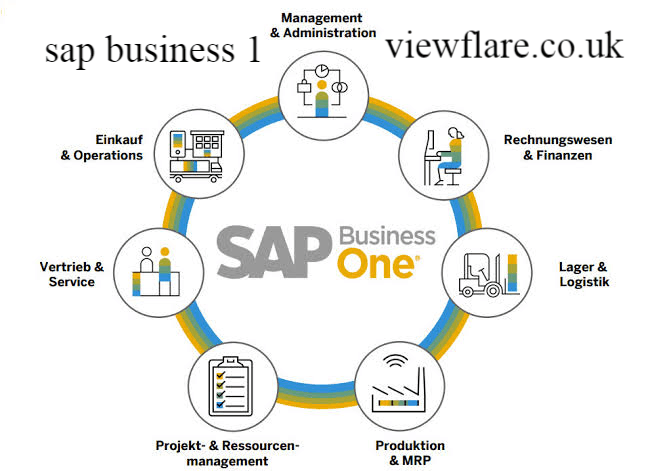
sap business 1e is more than accounting or inventory software. It is an integrated ERP platform designed to connect important business operations within a shared system.
Its financial management, purchasing, inventory, sales, CRM, production, service, project management, and analytics capabilities can provide growing businesses with greater visibility and control. SAP also supports cloud, on premises, mobile, integration, and extension options.
The biggest factor in success, however, is implementation. Define clear goals, involve users, clean your data, map processes, limit unnecessary customization, test thoroughly, and prepare for post go live support.
As of September 2026, SAP Business One remains documented as version 10.0, with SAP continuing to publish updates and enhancements through its official Help Portal. For example, SAP documents Service Pack 2605 as a current 10.0 update.
Custom FAQs
What is SAP Business One?
SAP Business One is an integrated ERP solution primarily designed for small and midsize businesses and subsidiaries of larger enterprises. It manages functions such as finance, sales, purchasing, inventory, customer relationships, reporting, and other business operations.
Is there an SAP Business One PDF?
Yes. SAP publishes official PDF documentation, solution briefs, technical documents, and learning materials related to SAP Business One. These resources can help users understand the platform, modules, implementation, and technical requirements.
Can I get an SAP Business One PDF free download?
Some official SAP Business One PDFs and learning materials are available without charge. However, a free PDF should not be confused with a free license for the SAP Business One software itself.
Is there an SAP Business One free download?
SAP provides official trial and learning resources, but businesses should not download unauthorized copies of the commercial ERP software from third party websites. Check SAP’s official trial options or contact an authorized SAP Business One partner for licensing information.
Where can I download SAP Business One?
The safest route is through SAP’s official resources or an authorized SAP Business One partner. SAP provides product documentation, technical resources, training, and trial information through its official channels.
What are the main SAP Business One modules?
The major functional areas include financial management, sales and CRM, purchasing, inventory, production, MRP, service, project management, and reporting and analytics.
Author Bio: Johan Harwen is a technology and business writer who covers SAP Business One, ERP solutions, digital transformation, and business software.His work focuses on practical, easy to understand insights that help businesses make smarter technology and implementation decisions.